
How to Install & Activate IPTV Apps on Samsung and LG Smart TVs (2026 Guide)
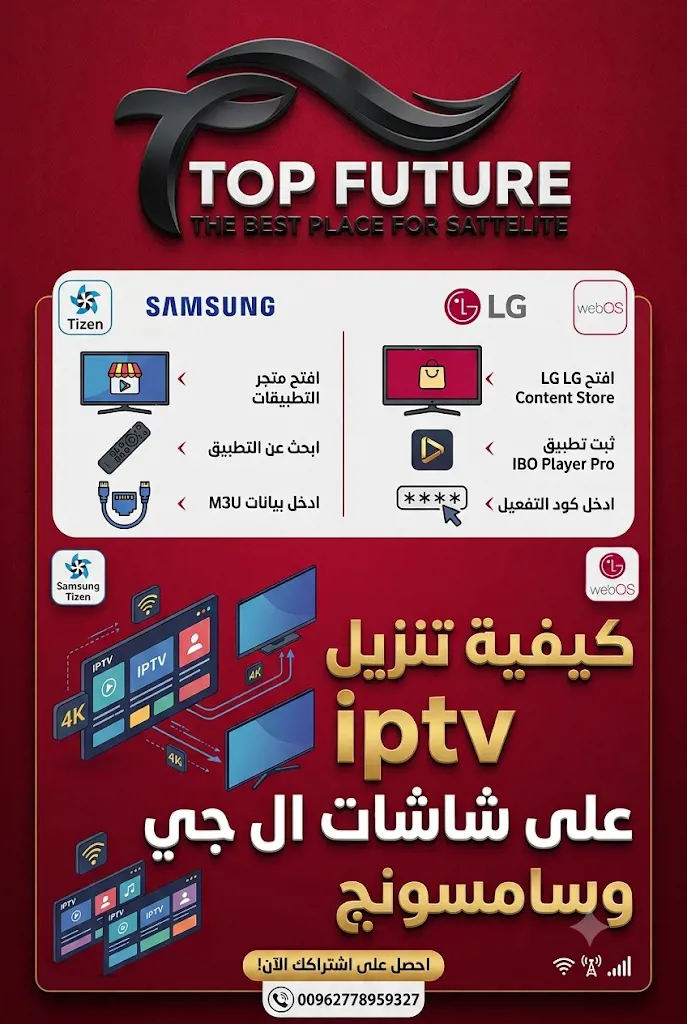
Yes — you can run IPTV apps directly on a Samsung or LG Smart TV without any external device on most modern models, by installing a player app from the TV's app store and activating it with a code or playlist from a trusted distributor like Top Future. This guide walks through the full process for both Samsung and LG, from installation to activation.
Top Future – Jordan's Leading IPTV Distributor for Smart TVs
At Top Future, we have extensive hands-on experience activating and installing every major IPTV service (Haha, MyHD, Mego, Hydra, Aroma, and more) on Samsung and LG Smart TVs across Jordan. Our team walks you through activation from the very first step until your channels are actually playing on screen, with remote support over WhatsApp if anything goes wrong during setup.
How do I run IPTV on a Samsung TV?
To run IPTV on a Samsung Smart TV (Tizen OS), follow these steps:
- From the home screen, press Apps and open the app store.
- Search for a player app such as Smart IPTV or IPTV Smarters and install it.
- Open the app — it will display a MAC Address unique to your TV.
- Send us that MAC Address over WhatsApp, and we'll link it directly to your subscription.
- Restart the app after activation and your channels will load automatically.
How do I run IPTV on an LG TV?
To run IPTV on an LG Smart TV (WebOS), the steps are similar:
- From the home screen, open the LG Content Store.
- Search for SS IPTV or Smart IPTV and install it.
- Open the app and note the MAC Address shown on screen.
- Send us the number over WhatsApp and we'll activate your subscription right away.
- Restart the app and start watching immediately.
+962 778 959 327
Do I need an external device to run IPTV on my TV?
Usually not. Most Samsung and LG TVs made from 2018 onward support IPTV apps natively. Only with very old TVs, or ones without a working app store, do we recommend a simple Android box as an alternative — and we'll help you pick the right one.
What if the app isn't available in my store?
Some apps are restricted by your store account's region. In that case we'll recommend an alternative app available in your region, or walk you through changing your account region to unlock the app you need — just message us and we'll guide you through it.
FAQ
How do I get an activation code or playlist link?
Just send us your MAC Address or the name of the app you installed over WhatsApp, and we'll send the activation straight away.
Does this method work on every Samsung and LG model?
Generally yes — only the menu location differs slightly, while the core steps (install the app, then activate with the MAC Address) stay the same.
Does it support 4K on these TVs?
Yes, as long as your TV supports 4K, your subscribed server offers 4K quality, and your internet speed is sufficient (15 Mbps or higher).
+962 778 959 327